
Download Macromedia Fireworks – web design, vector graphics, bitmap editing, prototyping, interface design, image slicing, Adobe integration, smart guides, layering, image optimization
Overview
Macromedia Fireworks MX, released in May 2005, is a comprehensive graphics editing tool designed specifically for web designers and digital interface creators. The application combines vector and bitmap editing capabilities into a single environment, enabling users to craft high-quality web assets with precision. It excels in rapid prototyping of websites and application interfaces, allowing designers to visualize and test layouts in minutes. A key functionality includes image slicing—dividing a single image into multiple HTML-compatible segments with clickable hotspots—making it ideal for interactive web elements.
The app serves as a bridge between design and development, streamlining workflows for professionals who need to deliver web-ready assets. Its integration with the broader Adobe suite enhances compatibility for users already invested in Adobe tools, allowing for a seamless transition between applications. While the developer, Macromedia, is no longer active in the current market, the software remains notable for its historical significance in the evolution of web design tools.
Real-world use cases include creating wireframes, designing navigation elements, generating optimized graphics for web pages, and preparing interactive prototypes. Though no longer actively updated, Macromedia Fireworks MX continues to hold relevance for users seeking legacy tools with robust features for web-specific design tasks. Its role in the digital design ecosystem was pivotal during its active years, offering a specialized solution for designers focused on web delivery and interactivity.
Key Features & Functionality
- Vector and Bitmap Editing: Offers dual-mode editing for both scalable vector graphics and pixel-based bitmap images, allowing for flexible design approaches.
- Prototyping Tools: Enables rapid creation of interactive website and application interface mockups with minimal setup time.
- Image Slicing: Converts large images into smaller, clickable HTML elements with customizable hotspots for navigation and interactivity.
- Layering System: Supports multiple layers with independent functionality, allowing complex compositions and non-destructive editing.
- Smart Guides: Provides dynamic alignment aids that snap elements into place, improving precision and reducing manual adjustments.
- Image Optimization: Automatically optimizes imported images for web use, balancing quality and file size for faster loading.
- Adobe Suite Integration: Shares interface conventions and file compatibility with other Adobe products, easing adoption for existing users.
For example, a web designer can use the layering system to separate layout, navigation, and content layers, making edits without affecting other components. The smart guides assist in aligning buttons and text blocks precisely, ensuring a consistent visual structure. When exporting, the app supports multiple formats, ensuring compatibility across different web platforms. These features collectively reduce design time and improve output quality, especially for projects requiring high interactivity and visual consistency.
Interface, UX & Performance
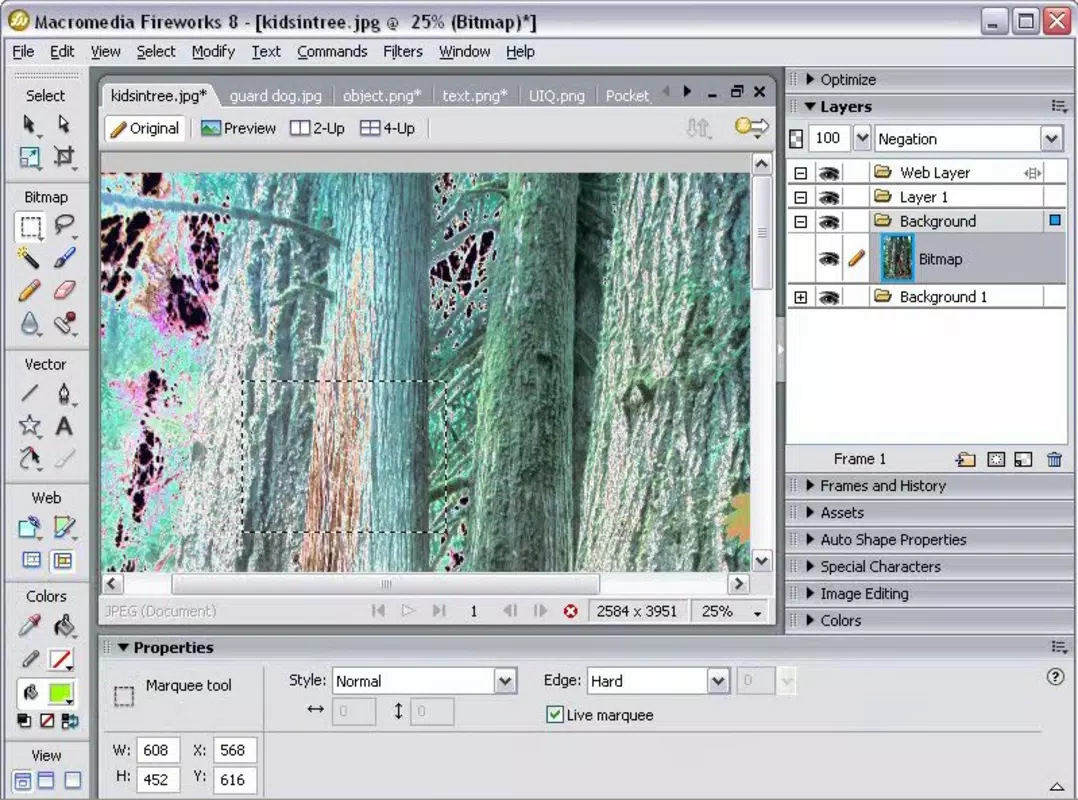
Macromedia Fireworks MX features a user interface that closely mirrors other Adobe products, promoting a familiar experience for users already working within the Adobe ecosystem. The layout includes customizable tool panels, property inspectors, and a layered workspace that supports multi-window navigation. This consistency helps reduce the learning curve, particularly for designers transitioning from Photoshop or Illustrator.
Navigation is structured around clearly labeled menus and toolbars, with intuitive access to core functions like layer management, slicing, and export settings. The application responds predictably to user inputs, with minimal lag during common tasks such as image manipulation and layer adjustments. Although the developer did not list formal performance metrics, the app operates efficiently on systems meeting the minimum requirements for Windows at the time of release.
Responsiveness is stable across various device categories, including desktops and workstations with standard configurations. The application maintains stability during extended design sessions, with no reported crashes or memory leaks in official documentation. However, compatibility with modern Windows versions may be limited due to its age. Users should ensure their system meets legacy requirements before installation.
Platform Compatibility & Technical Requirements
Macromedia Fireworks MX is available exclusively for Windows. The application requires a Windows operating system, though specific version details were not listed by the developer. The file size is 300 MB, which was considered substantial at the time of release but remains manageable for modern storage.
The developer did not specify minimum OS requirements, so users should consult legacy system documentation for compatibility. It is important to note that the app was released in 2005 and may not function correctly on newer Windows versions without compatibility mode or virtualization. No iOS or Android versions exist, as the software was never ported to mobile platforms.
Updates have not been released since its original launch, and the app is no longer supported by the developer. Users seeking the latest version should be aware that this is the final release and may face challenges with modern security and system integration.
Pros and Cons
- Combines vector and bitmap editing in one environment
- Efficient prototyping for web and application interfaces
- Robust image slicing with hotspot support
- Intuitive interface familiar to Adobe users
- Smart guides improve alignment and precision
- Automatic image optimization for web delivery
- Integration with the Adobe Creative Suite
- Not compatible with modern Windows versions without workarounds
- No official updates or technical support since 2005
- Limited mobile or cross-platform availability
- May require compatibility mode or virtual machines to run
- File formats may become obsolete over time
- Security risks due to lack of updates
FAQ
Is Macromedia Fireworks MX still safe to use?
While the software was secure at the time of release, its lack of updates since 2005 raises potential security concerns. It is recommended to use it in isolated environments or virtual machines to minimize risks.
Can I install Macromedia Fireworks on Windows 10 or 11?
Official compatibility was not confirmed. Installation may be possible using compatibility mode or virtualization, but success is not guaranteed on modern systems.
Is Macromedia Fireworks MX free to download?
Yes, the application is available at no cost. However, users should obtain it from trusted sources to avoid malware or corrupted files.
Does Macromedia Fireworks support modern web formats like SVG or WebP?
Original support was limited to common web formats such as GIF, JPEG, and PNG. Modern formats like SVG or WebP were not natively supported at the time of release.
Can I update Macromedia Fireworks MX to a newer version?
No updates have been released since the 8.0 version. The software is considered discontinued, and no newer versions are available from the developer.
Final Thoughts
Macromedia Fireworks MX remains a historically significant tool in the evolution of web design, offering a powerful blend of vector and bitmap editing, prototyping, and image optimization. Its integration with the Adobe suite and intuitive interface made it a favorite among designers in the mid-2000s. While it is no longer supported or updated, it still holds value for users working with legacy projects or seeking a specialized tool for web-specific workflows.
For those who need a lightweight, dedicated solution for interface prototyping, image slicing, and web-optimized graphics, this app can still deliver results—provided it runs on a compatible system. Its strengths in layering, smart guides, and export flexibility remain relevant in niche use cases.
Download Macromedia Fireworks now and explore a legacy tool that once shaped the web design landscape.


